
Customer reviews can provide valuable insight into how people experience a business, from what they appreciate most to the frustrations that might be affecting their overall satisfaction. Looking beyond individual reviews to identify recurring themes and patterns can help businesses better understand customer sentiment and identify opportunities for improvement.
When I first started working in reputation management, I analyzed customer feedback manually, organizing reviews in spreadsheets and tracking recurring keywords, complaints, and compliments. It was time-consuming, but also incredibly informative. Reading through the reviews and organizing the data myself helped me become familiar with customers’ experiences and recognize patterns that might otherwise have been overlooked.
I still think there’s a lot of value in that hands-on approach. Taking the time to read through reviews as you collect and organize them can help you develop your own understanding of customer sentiment before introducing AI into the process. From there, AI can help you analyze larger amounts of feedback, identify recurring themes, and transform the information into organized reports and insights that can be shared with management or other stakeholders.
These findings can also provide a starting point for meaningful business improvements. For example, if customers frequently mention long service times, a business might investigate its current processes, introduce changes, and monitor subsequent reviews to see whether customer experiences appear to improve.
In this tutorial, I’ll walk you through how to collect and prepare customer reviews, use AI to analyze feedback, generate a customer experience insights report, and create a presentation and discussion guide to help communicate your findings. I’ve also included a customizable review collection spreadsheet, sample AI prompts, example reports, and best practices to help you get started.
The goal isn’t to have AI make business decisions for you, but to use it as a tool to better understand customer feedback, explore potential improvements, and support more informed decisions. You can use the resources and examples provided here as a starting point, then customize the process to fit your business, available data, and specific goals.
Review Collection Options
There are several options to get the data into the AI. Some sites block AI models from fetching content or the models may not be able to capture all of the information, so it may be necessary to provide that information yourself. Below are some options to consider:
| Method | Advantages | Limitations |
| Copy and paste reviews | Free, simple, accessible | Tedious and easy to miss reviews |
| Upload an existing CSV or spreadsheet | Organized, supports larger datasets | Requires obtaining the review data |
| Ask AI to analyze a review webpage | Minimal manual work when supported | May retrieve incomplete or no data |
| Use an API or authorized review management tool | Better suited to recurring analysis | Setup, permissions, or cost may be involved |
Gather and Prepare Your Reviews
In my experience, I’ve found that it’s helpful to organize reviews in a spreadsheet so not only is it easy to upload for the AI model to evaluate, but it also creates documentation of that feedback for business records. This is useful to track trends and changes in sentiment over time, especially since some review sites only keep reviews for a limited length of time.
Additionally, although manually collecting reviews may feel tedious, it’s a really informative exercise that helps build familiarity with how customers feel about the business, and there might be some nuances you notice that might not otherwise get captured or help you improve the data you choose to collect.
For example, in creating this tutorial, I documented reviews for the largest McDonald’s restaurant in the U.S. As I started compiling the data, I found opportunities to collect even more data than I originally planned, since the Google reviews had not only an overall star rating, but also star ratings for food, service, and atmosphere. By including these ratings, I could help the AI model pinpoint more points of specific and relevant data to analyze to produce a more meaningful report.
Additionally, I started tracking whether the business responded to any reviews and noticed something interesting: there were typically only responses to the most negative responses, but I noticed a discrepancy – in my small sampling, it appeared that the business did not respond to reviews that were originally not in English (although they were translated to English by Google Reviews). So that would have been an interesting data point to add – the original review language – to determine whether there actually was a pattern.
As you are compiling review data, make a list of noteworthy findings or potential questions to address throughout this process.
Creating a Process & Schedule
It’s helpful to develop a process and schedule for this to set aside time to collect and analyze review data.
I’d start by collecting data from the last year or so, starting with the most recent and working backward, to create a history of review data. This is extremely helpful in identifying potential trends, like increased business during specific months or events, and being able to pinpoint when specific feedback was received to potentially link it to things like a change in staff or business process.
Once the initial data is collected, I’d come up with a simple process and set aside time each month or quarter to focus on review analysis.
For example, for a monthly review:
- Starting point: collect review data for the last 6+ months to capture trends and a baseline of data
- Recurrence: aim to present findings on day 7-10 of each month to allow for review collection, response, and analysis
- Data: add reviews leading up to the current month
- Note: were there any special promotions, events, or known issues during the reporting month
Resource: A Customizable Review Analysis Spreadsheet
As a resource, I’m including a link to free reusable review analysis spreadsheet. This is a combination of a sentiment analysis process I did as a consultant and my work in reputation management, and is a helpful way to consolidate customer feedback.
You can access the Google Sheet here:
Customize Your Review Analysis Spreadsheet
I’ve included the sample spreadsheet above to help you get started organizing customer reviews for analysis. However, the information available will vary depending on the business, industry, and review platform you’re using.
At a minimum, consider including the review date, rating, and written feedback, along with a unique review ID so you can easily reference individual reviews. I also recommend including the original review URL and reviewer name or username when available, particularly if you may need to revisit a review, respond to it, or investigate a concern.
You may also have access to additional information that could provide valuable insights. For example, restaurant reviews might include feedback about parking, dietary options, noise levels, or whether the location is family-friendly. Other businesses may have completely different factors worth tracking.
Don’t feel limited by the columns in the sample spreadsheet. Add, remove, or customize fields based on what you want to learn about your business and its customers.
The downloadable template also includes a Suggested Data Fields tab with recommended and optional columns to consider when preparing your own review analysis.
Remember that more data isn’t always better. Focus on collecting relevant, reliable information that can help you identify meaningful patterns and opportunities for improvement.
A Few Additional Considerations
Keep review data separate from AI-generated findings. Avoid adding columns for sentiment, themes, or recommended actions to the original dataset unless there’s a specific reason. Those are results of the analysis rather than original source data, and keeping them separate makes it easier to verify findings.
Be consistent when recording missing information. For example, use blank cells or a consistent “Not available” value instead of guessing. This is particularly important if you’re using AI to analyze the spreadsheet.
Pay attention to the analysis period. Reviewing 100 comments from the past month could tell a very different story than reviewing 100 comments collected over five years. It’s worth explaining why the date range and number of reviews matter when interpreting results.
Choosing the AI Tool
Below is a comparison of the capabilities of three free AI models as a reference. Use whichever tool you prefer or try a few to compare their results (for this example, I used all three). As always, confirm the accuracy of the results – AI can make mistakes and misinterpret data so use your own knowledge and judgment when reviewing.
| Capability | Claude Free | ChatGPT Free | Gemini Free |
| Analyze pasted reviews | Yes | Yes | Yes |
| Work with uploaded files | Yes | Yes | Yes |
| Analyze spreadsheets | Yes | Yes, with limits | Yes, with limits |
| Generate spreadsheet outputs | Yes | Yes, with limits | Yes, with limits |
| Web searching | Yes | Yes | Yes |
| Read every review from a public website automatically | Not guaranteed | Not guaranteed | Not guaranteed |
Using AI to Analyze, Create a Report & Guide Discussion
It’s helpful to split the analysis into stages: understanding the feedback, turning the findings into a deliverable, and understanding how to present these findings in a meaningful way. This can be done in three prompts:
- Prompt 1: Analyze the data – Find evidence and patterns
- Prompt 2: Communicate the findings – Create a business report
- Prompt 3: Facilitate decisions – Prepare for discussion and action
Technically, these requests could be rolled up into one singular prompt, but it’s best to separate requests to avoid overloading the AI model and to also allow an opportunity to ask questions, make changes, or provide feedback after each response.
For example, in reviewing the initial analysis, it’s possible the model could have gotten stuck on feedback that’s mentioned frequently in reviews, but is no longer an issue for the business or a known issue that doesn’t need to be discussed. If this appears as a key finding in the analysis, sending these requests separately allows the opportunity to provide that feedback to the model to either disregard that issue before it moves on to creating the report.
Or perhaps you notice something off or something management has previously raised concerns about in the report – by reviewing the report before requesting the presentation guide, you can mention this so the model includes key points or questions to discuss.
Note: The sample prompts below are just an example of how prompts can be written to perform an analysis, create a report, and provide a discussion guide. Adjust the prompts as needed to align with your business needs.
1. Sample Prompt for Requesting an Analysis of Review Data
This first prompt asks the AI model to analyze the review data and includes rules to avoid inventing data. The results may appear overly technical, but are a building block for the next prompt, which asks the model to create a customer experience insights report which makes the data much easier to understand.
Copy the prompt text below to paste in a message to the AI model and don’t forget to also attach your review data/spreadsheet:
I’m analyzing customer reviews to better understand customer experiences and identify potential opportunities for business improvement.
Review the attached spreadsheet and perform a thematic and sentiment analysis.
Please:
- Identify the most common positive and negative themes mentioned in the reviews.
- Count how many unique reviews mention each theme. A review may mention multiple themes.
- Describe whether sentiment toward each theme is primarily positive, negative, mixed, or neutral.
- Identify recurring language, unusual expressions, or nicknames that may suggest customer perceptions or reputation concerns.
- Identify any meaningful patterns over time, if the data supports them.
- Provide supporting review IDs or references for each major finding.
- Suggest potential areas for further investigation, distinguishing customer-reported problems from hypotheses about their causes.
Present the results in a concise, organized format.
Important:
- Base your findings only on the supplied reviews.
- Do not invent review content, statistics, or customer opinions.
- Clearly identify the number of reviews analyzed.
- Distinguish the frequency of an issue from its severity.
- Acknowledge any limitations in the data.
- Avoid assuming that reviewers represent the entire customer base.
End of prompt
Review the results to check for any unexpected or unexplained results and don’t hesitate to ask the model to explain anything that doesn’t make sense to you, providing specific examples.
The model may also need some clarification or confirmation that data is correct. For example, my analysis from Claude included a list of inconsistencies such as “R41’s text says it gave a 5, but the star rating is 3.” Before proceeding, I’d want to double check that review to ensure I didn’t mistype the ratings and if so, update my data and let Claude know that was an error on my part so the analysis can be corrected.
2. Sample Prompt for a Customer Experience Insights Report
Now that the model has analyzed the data, that analysis can be used to turn customer feedback into business insights that someone can actually use to make decisions.
The first prompt does the analytical work. It identifies themes, counts mentions, evaluates sentiment, and looks for patterns. But the output is more like an analyst’s working notes than something you’d hand to a business owner or leadership team. This prompt will ask the AI model to transform that data into a report that is easier to understand and includes visuals.
Copy the prompt text below and paste it as a response to the AI model’s analysis of the review data:
Using the customer review analysis you just completed, create a professional Customer Experience Insights Report that could be presented to a restaurant owner, general manager, or business leadership team.
Objective: Translate the analysis into a concise, visually engaging, easy-to-understand business report. The report should help decision-makers understand what customers appreciate, where they experience problems, and what areas may deserve further investigation or improvement.
The audience is business leadership, not data analysts. Use clear, conversational business language. Minimize technical terminology and focus on actionable insights rather than explaining the analytical methodology.
Report structure
1. Executive Summary
- Identify the 3–5 most important findings.
- Briefly explain what the reviews suggest about the overall customer experience.
- Highlight the most significant business opportunities or concerns.
2. Customer Sentiment Snapshot
- Show the total number of reviews analyzed.
- Include a visual breakdown of overall star ratings.
- If available, summarize food, service, and atmosphere ratings separately.
- Include spending information only if it provides meaningful insights.
- Make clear when a metric uses fewer than the total number of reviews because of missing data.
3. What Customers Appreciate
- Present the most frequently mentioned positive themes.
- Include the number and percentage of reviews mentioning each theme.
- Use a simple bar chart or similar visual.
- Briefly explain why each finding may matter to the business.
4. Where Customers Experience Friction
- Present the most frequently reported negative themes.
- Include review counts and percentages.
- Explain the potential business implications.
- Distinguish frequently mentioned inconveniences from less frequent but potentially serious issues.
5. Reputation and Customer Expectations
- Highlight recurring language, distinctive expressions, nicknames, or patterns that suggest customer perceptions.
- Identify any notable differences between what customers expected and what they experienced.
- Include a few short, representative quotations from actual reviews, with review references.
- Do not exaggerate the prevalence of expressions mentioned only once or twice.
6. Opportunities for Improvement
Create a concise table containing:
- Opportunity or area of concern
- What customers reported
- Why it may matter
- Recommended next step
- Supporting review references
Prioritize potential actions using the frequency and potential severity of concerns. Clearly distinguish customer-reported problems from hypotheses about their causes. Frame recommendations as areas for investigation or validation rather than assuming root causes are known.
7. Key Takeaways
Conclude with three practical recommendations for the business to consider.
Design and presentation
- Create a polished, business-ready report suitable for export as a PDF.
- Aim for approximately 2–3 pages, with a clean layout and consistent formatting.
- Use clear section headings, short explanations, charts, and tables.
- Use visualizations where they make the information easier to understand.
- Avoid dense paragraphs, excessive statistics, and unnecessary technical detail.
- Emphasize insights and business implications rather than raw data.
- Include a short methodology and limitations note.
Accuracy requirements
- Base all findings exclusively on the supplied spreadsheet and the verified results of the previous analysis.
- Do not invent review content, quotes, statistics, or customer opinions.
- Verify all counts and percentages against the original data if available.
- A single review may mention multiple themes, so theme percentages do not need to total 100%.
- Do not present estimated or inferred information as established fact.
- Include review IDs or spreadsheet row references for significant findings.
- Clearly distinguish observation, interpretation, and suggested action.
- Do not assume the sample represents the entire customer base.
- If the available tools cannot create a PDF or other formatted document, provide a clearly structured report that can be copied into a document editor.
The final report should answer three simple business questions: What are we doing well? What needs attention? What should we look into next?
End of prompt
Review the report to ensure everything presented makes sense and make a list of any questions or concerns you have about the report.
- Is anything unclear?
- Is anything a known pain point you want to address?
- Is anything irrelevant?
- Is there anything that should not be included in this report?
- Is anything missing from this report?
- Does anything need further clarifications?
These are all things to discuss with the model to ensure the report makes sense and is something you’re willing to present. Send your list of questions and any concerns to the model so they can be clarified. Once your questions and concerns have been addressed, have the model make any necessary updates to the report before proceeding.
Don’t just trust the model’s output; review the information and evaluate it with the knowledge you have to ensure it makes sense based on what you know. AI models are excellent at analyzing data and picking up on patterns, but occasionally get stuck on details that appear frequently, but are irrelevant.
3. Sample Prompt for Requesting a Presentation and Discussion Guide
At this point, the model has provided an analysis and a report based on the findings. But there’s a meaningful difference between generating a report and being prepared to explain its findings, answer questions, and facilitate decisions.
This prompt will ask the model to create a presentation and discussion guide that includes three particularly helpful parts:
Preparing for skeptical questions
This is something people often overlook when preparing presentations. It’s relatively easy to explain findings to an audience that agrees with you. It’s harder when someone questions the data, methodology, or conclusions.
For example, someone might ask “How do we know these complaints aren’t just coming from a handful of unhappy customers?”
A good suggested answer might explain that review analysis identifies patterns among people who submitted reviews, but doesn’t establish how the entire customer base feels. Additional data, such as customer surveys, support tickets, or retention metrics, could help validate the findings. That answer acknowledges a legitimate limitation while explaining how the analysis can still be useful.
Helping to facilitate a conversation
Rather than ending with “Any questions?”, more productive questions could be asked, like “Are these concerns consistent with what your teams are hearing from customers through other channels?” or “Of the issues we’ve identified, which do you think would have the greatest impact on the customer experience if we addressed them?”
Those questions invite stakeholders to contribute their knowledge instead of treating the AI analysis as the final authority.
Turning a presentation into an actionable outcome
This helps ensure that even if the meeting doesn’t produce immediate decisions, it produces a clear plan for what happens next.
Copy the prompt text below and paste it as a response to the AI model’s customer experience insights report or discussion:
Using the customer review analysis we’ve completed, create a practical Presentation and Discussion Guide to help someone confidently explain the findings to business leaders or stakeholders.
Assume the presenter may not have extensive experience presenting business analysis findings. Use clear, professional, conversational language and avoid unnecessary jargon.
Organize the guide into the following sections:
1. Presentation Overview
- Explain the purpose of the analysis and what the audience should understand by the end.
- Identify 3-5 key takeaways worth emphasizing.
- Suggest a logical flow for presenting the findings.
2. Presenter Talking Points
- Provide a brief, natural-sounding script or talking points for each major finding.
- Explain why each finding matters to the business and its customers.
- Include examples from the reviews where appropriate, without unnecessarily identifying reviewers.
- Clearly distinguish between confirmed findings, interpretations, and potential opportunities.
3. Anticipated Questions and Suggested Answers
- Identify 8-10 questions stakeholders might reasonably ask about the findings, methodology, reliability, and potential next steps.
- Provide concise, understandable suggested answers grounded in the analysis.
- Include challenging or skeptical questions, such as whether the reviews represent the broader customer base or whether the findings justify operational changes.
- If a question cannot be answered using the available data, explain how the presenter should acknowledge that limitation and suggest how the answer could be investigated.
4. Discussion Questions for Stakeholders
- Suggest 5–7 open-ended questions the presenter can ask to encourage productive discussion.
- Focus on validating findings, understanding possible root causes, identifying existing initiatives, and exploring improvement opportunities.
- Avoid questions that assume the analysis has already established the causes of customer dissatisfaction.
5. Recommended Next Steps
- Suggest practical follow-up activities based on the findings.
- Separate immediate, low-effort actions from opportunities requiring additional research or resources.
- Identify which recommendations should be validated before implementation.
- Suggest potential owners or departments where appropriate, without assuming the company’s organizational structure.
6. Closing and Follow-Up
- Provide a brief closing statement that summarizes the value of the analysis and invites discussion.
- Suggest 3-5 potential decisions or action items the group could agree on.
- Create a simple post-presentation follow-up checklist to help the presenter document questions, decisions, responsibilities, and next steps.
Important Guidelines:
- Base the guide on the actual findings from the customer review analysis.
- Do not invent statistics, customer feedback, business processes, or root causes.
- Distinguish clearly between what the data shows and what requires further investigation.
- Frame recommendations as opportunities to explore rather than definitive solutions.
- Keep the guide practical, easy to scan, and suitable for use during a live meeting.
The goal is to help the presenter communicate findings clearly, respond thoughtfully to questions, and guide the audience toward meaningful next steps – not simply read a report aloud.
End of prompt
Read through the guide to ensure you understand the guidance provided. If anything is unclear or is worded in a way that doesn’t make sense to you, communicate that to the model to ensure the discussion guide makes sense to you.
For example, “please simplify the closing script to sound less corporate-speak and use simplified, natural language” or “provide the talking points in a bulleted list instead of paragraphs, with each statistic on its own line” each let the model know your expectations and what will be helpful to improved the guide to suit your needs.
Optional Prompt 3 Enhancement: Reference Sheet
You could also opt to have the model produce two versions of the presentation guide:
- A detailed preparation guide: Includes background explanations, anticipated questions, suggested answers, and supporting evidence.
- A one- or two-page presenter reference sheet: Includes the key findings, essential talking points, discussion prompts, and recommended next steps.
The detailed version helps to prepare, while the shorter version gives something practical to reference during the meeting.
You could simply add this instruction to the end of your third prompt:
After completing the detailed guide, create a condensed, one- or two-page presenter reference sheet containing the most important talking points, anticipated questions, stakeholder discussion prompts, and recommended next steps. Format it for quick reference during a live presentation rather than as a word-for-word script.
The Results
For this project, I documented 50 reviews for the largest McDonald’s restaurant in the U.S. for my sample data, then, using the prompts above, I used Claude, ChatGPT, and Gemini to analyze the same customer review dataset and create presentation and discussion guides based on their findings.
I’ve included the reports and discussion guides generated by all three tools so you can explore the results and compare their approaches if you’re interested. They’re labeled with the AI model name and the prompt numbers from above to show the results from each stage of the process.
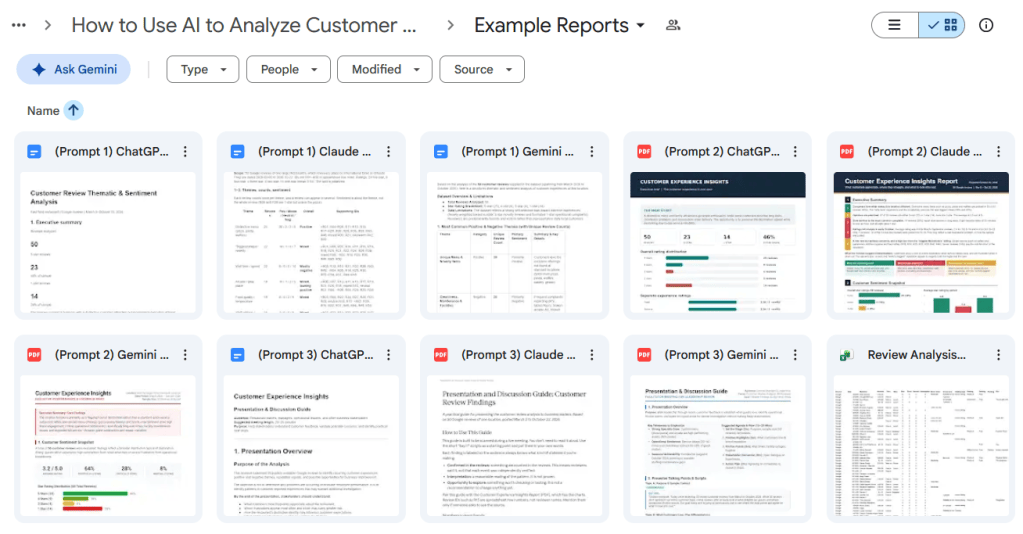
These examples are provided for reference, not as definitive findings or recommendations. AI-generated analyses should always be reviewed for accuracy before being used to inform business decisions.
Related
Why Your AI Prompt Didn’t Work and How to Fix It
Learn why AI prompts sometimes produce disappointing results and how to fix them. This tutorial breaks down common prompt problems – including missing context, vague goals, conflicting instructions, insufficient source information, unclear formatting, and invented details – with practical examples and tips for getting more useful, accurate responses.

How to Use AI to Improve Your LinkedIn Experience Descriptions
Learn how to use generative AI to organize, strengthen, and update your LinkedIn experience descriptions without inventing accomplishments. This tutorial walks through gathering accurate career information, identifying relevant themes, creating consistent descriptions, reviewing AI-generated content, and preserving a reliable record of your work history.
Stay Updated
There are two easy ways to get notified when new tutorials are published:
Subscribe on YouTube for new video tutorials: @SimpleSoftwareTutorials
or enter your email below to receive new blog posts directly in your inbox:

